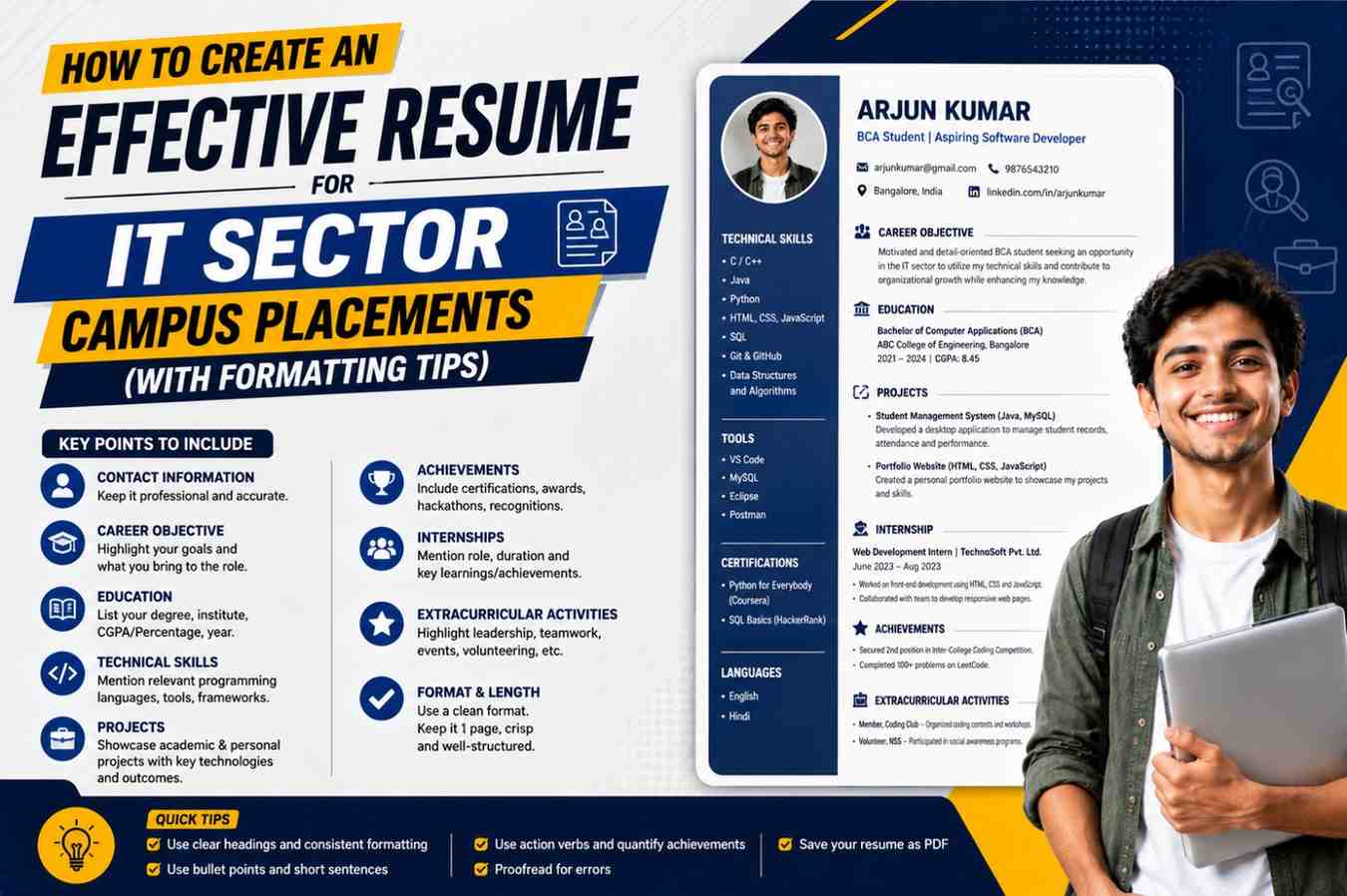
How to Create an Effective Resume for IT Sector Campus Placements: For students preparing for campus applications, a resume is more than a mere document. It will be your very first appearance. When recruiters are evaluating your abilities to communicate and technical expertise, or your ability to solve problems, they typically review your resume. In most instances, it takes just one minute for recruiters to decide if you should proceed to the next step during the interview process.
This is the reason why drafting an efficient resume is among the most important steps of your journey to prepare for your interview. A well-designed resume will show your strengths, highlight your work, and show your abilities, even if you do not have a great deal of professional knowledge.
Many students think that resumes must be filled with accomplishments to draw the attention of employers. In reality, they are seeking clarity, relevance, and evidence of the skills. Even freshers can put together an impressive resume by providing information in the correct manner.
In this article, you will discover how to write an impressive resume to get IT sector campus positions. What sections should you include, what common mistakes to avoid, and ways to help your resume stick out.
Why a Good Resume Matters in Campus Placements
Campus placement recruiters usually receive thousands or hundreds of applications. They need a speedy and effective method of identifying the most suitable candidates.
A strong resume helps recruiters:
- Be aware of your educational background
- Assess your technical abilities
- Review project experiences
- Find leadership and teamwork traits
- Find out if you are suitable for the job
For students who are just starting, their resumes serve as an intermediary between their academic studies and career opportunities.
Understand What IT Recruiters Look For
Before you write your resume, it is crucial to know what employers typically expect from recent graduates.
The majority of IT recruiters concentrate on:
- Academic performance
- Technical abilities
- The programming knowledge
- Experience and projects
- Ability to solve problems
- Communication skills
- Internship experience
- Certifications
- Extracurricular accomplishments
Your resume should highlight these areas professionally and clearly.
Essential Sections of an IT Placement Resume
1. Contact Information
Begin by listing your basic contact information on the front of your resume.
Include:
- Full Name
- Mobile Number
- Professional Email Address
- LinkedIn Profile
- GitHub Profile (if there is one)
- Portfolio Website (optional)
Example:
Rahul xyz
Phone: +91 XXXXX XXXXX
Email: xyz@email.com
LinkedIn: linkedin.com/in/rahulxyz
GitHub: github.com/rahulxyz
Formatting Tip
Make sure you have a professional email address that is based on your name. Avoid email addresses with casual names, which may look unprofessional.
2. Career Objective or Professional Summary
A short objective for your career helps recruiters to understand your objectives and passions.
Example:
“Motivated BCA student with strong knowledge of Java, Python, and web development. Passionate about building innovative software solutions and eager to contribute to a dynamic IT organisation while continuously enhancing technical skills.”
Formatting Tip
Make sure this section is between 2 and four lines. Beware of statements that can be used by anyone.
3. Educational Qualifications
Since college placements mostly target students in the freshman phase, education should be at the very top of your resume.
Mention:
- Degree
- Institution Name
- University
- Passing Year
- Percentage or CGPA
Example:
Bachelor of Computer Applications (BCA)
XYZ College, ABC University
2023-2026
CGPA: 8.4/10
Class XII
ABC Senior Secondary School
Percentage: 88%
Class X
XYZ Public School
Percentage: 91%
Formatting Tip
The list of education is in chronological reverse order, beginning with the latest certification.
4. Technical Skills
This is among the most important areas to be considered for IT placements.
Classify the abilities.
Example:
Programming Languages
- Java
- Python
- C++
Web Technologies
- HTML
- CSS
- JavaScript
Databases
- MySQL
- MongoDB
Tools and Platforms
- Git
- GitHub
- Visual Studio Code
Operating Systems
- Windows
- Linux
Formatting Tip
Be sure to mention any skills you can confidently talk about in interviews.
5. Academic Projects
Projects demonstrate the practical application of the technical know-how.
In each project, add:
- Project Title
- Technologies Used
- Brief Description
- Key Contribution
Example:
Student Management System
Technologies: Java, MySQL
Created a desktop application for keeping track of students’ attendance records, student records and exam information. Implemented database connectivity as well as user authentication functions.
Online Quiz Platform
Technologies: HTML, CSS, JavaScript
Created and designed an online quiz platform, complete with a timer and score tracking.
Formatting Tip
Make sure you focus on the results and contributions instead of listing names of projects.
6. Internship Experience
If you’ve been through an internship program, be sure to mention it, even when it was only temporary.
Example:
Web Development Intern
ABC Technologies | June 2025 – August 2025
- Created responsive web pages using HTML, CSS, and JavaScript.
- Collaboration alongside team members in projects for clients.
- Increased performance of websites through the optimisation of code.
Formatting Tip
Use action words like:
- Developed
- Designed
- Implemented
- Created
- Optimized
- Collaborated
7. Certifications
Certifications demonstrate initiative and dedication to continue learning.
Examples include:
- Python Programming
- Java Fundamentals
- Data Structures
- Cloud Computing Basics
- Web Development
- SQL and Database Management
Mention:
- Certification Name
- Issuing Organization
- Completion Year
Formatting Tip
Make sure to include only relevant certificates that will add value to the profile.
8. Achievements
This section can help distinguish your resume from other applicants.
Examples:
- Rankings of competitions in coding
- Hackathon participation
- Academic Awards
- Scholarship achievements
- The technical event is a winner
Example:
- The team was able to secure the top 10 spot in an inter-college competition for coding.
- Finalist in a university hackathon.
- Academic excellence award for exceptional performance.
9. Extracurricular Activities
The recruiters are attracted to people with balanced personalities.
Examples:
- Student club participation
- Event management
- Sports accomplishments
- Volunteering activities
- Community contributions from the technical side
Example:
- The college tech fest was organised by 20 students.
- Active participant in Coding Club.
- Volunteer to help with community education programs.
Resume Formatting Tips That Make a Difference
A properly formatted resume is simpler to read and makes an impression of professionalism.
Keep It One Page
For those who are new, one page should be enough.
Do not exceed two pages when you have extensive work experience or an internship.
Use Professional Fonts
The fonts that are recommended:
- Calibri
- Arial
- Helvetica
- Times New Roman
Guidelines for Font Size:
- Heading: 14-16
- Subheading: 12-14
- Body Text: 10-12
Avoid decorative fonts.
Maintain Proper Margins
Use the standard margins of 0.5 to 1 inch.
This makes it easier to read and helps keep the layout tidy.
Use Bullet Points
Recruiters scan resumes.
Bullet points make it easier to present information in a clear manner and increase readability.
Instead of:
“Worked on multiple software development activities involving coding and testing.”
Write:
- Application modules that were developed.
- Tested and debugged.
- Improvement in the efficiency of code.
Use Consistent Formatting
Be consistent with respect to:
- Font style
- Font size
- Structure of the heading
- Date format
- Bullet designs
Consistency gives a polished look.
Save as PDF
Always keep and save the resume in PDF format.
Benefits include:
- Preserves formatting
- Compatible across devices
- Appears professional
Common Resume Mistakes Students Should Avoid
Including Irrelevant Information
Avoid adding:
- Personal views
- Family information
- Unrelated interests
- Personal information with a lot of detail
Be sure to keep your content that is relevant to your professional goals.
Using Generic Objectives
Beware of statements such as:
“Looking for a challenging position in a reputed company.”
Instead, you should create a custom target that aligns with your abilities and passions.
Listing Too Many Skills
You should not mention technologies that you’ve barely utilised.
Recruiters may ask detailed questions during interviews.
Spelling and Grammar Errors
Even minor mistakes can give an impression that is negative impression.
Before submitting:
- Check spelling
- Review grammar
- Verify dates
- Confirm contact details
Copying Resume Templates Without Customisation
Many students utilise the same templates.
Your resume should be customised to highlight your individual strengths, your projects and accomplishments.
How to Tailor Your Resume for Different IT Roles
Different IT jobs require different skills.
Software Developer
Highlight:
- Programming languages
- Data structures
- Projects
- Skills for problem-solving
Web Developer
Highlight:
- HTML
- CSS
- JavaScript
- Responsive design projects
Data Analyst
Highlight:
- SQL
- Python
- Data visualization
- Analytical projects
Cloud and Infrastructure Roles
Highlight:
- Cloud certifications
- Linux
- Networking fundamentals
- Knowledge of virtualisation
Personalising your resume will increase its effectiveness and increase the chances of being selected for a job.
Final Resume Checklist Before Submission
Before submitting your resume, make sure you check the following information:
The contact details are accurate
Resumes are limited to one page, if possible.
The technical skills are precise
Projects are clearly outlined
Formatting is uniform
Spelling and grammar are free of errors
Resume is saved in PDF
LinkedIn and GitHub hyperlinks work correctly
The information is up-to-date and current.
Conclusion
Making a strong resume to apply for IT sector campus positions does not require decades of expertise. It’s about showing your educational background, skills, accomplishments, projects, and other achievements in a professional and clear way. A well-written resume demonstrates to recruiters that you’re focused, committed to your career, and eager to make a difference in their company.
Make sure you highlight your skills in a practical manner, and projects that are meaningful, and ensure a neat format. Be aware that your resume is the first opportunity to impress; take your time creating it with care.
If you have the correct layout, the right structure and content that is relevant, your resume will become an effective tool that can help you get interviews and take just one more step towards securing your ideal IT job.